• ITSUKI DOI
  • works
  • releases
  • devices
  • cv
  • log

Max for Live devices, built for my own studio and shared as-is.

Kowane Turns a voice into sine waves, and lets any instrument speak. Max for LiveAudio + MIDI EffectMax 9 $10 Hamon A polyphonic LFO driven by a fluid simulation, not a clock. Max for LiveLFO $10 JV-1080 Select Browse and recall Roland JV-1080 patches from Live. Max for LiveHardwareLive 11.1+ Free FS1R Select Browse and recall Yamaha FS1R performances from Live. Max for LiveHardwareLive 11.1+ Free

Questions, bug reports or re-downloads: shop@cotofu.com

policies / licenses / 特定商取引法に基づく表記

Max for Live device

Kowane

Turns a voice into sine waves, and lets any instrument speak.

Type
Audio Effect + MIDI Effect
Version
1.1
Price
$10
Manual
Read the manual
Pay with PayPal instead

DRM free. No license keys, no online activation. The file you download is yours to keep, and updates within the same major version are free.

Voice: AI-generated (OpenAI TTS). 0:00 the voice, 0:10 Kowane's sine waves (4 → 16 voices), 0:20 "Now, let the piano speak." (original voice), 0:24 Kowane MIDI playing a piano.

Kowane turns a voice into a handful of sine waves: sine-wave speech. Its companion, Kowane MIDI, turns the same analysis into notes, so a piano or any instrument can follow the voice and start to speak. The name comes from 声音 (kowane), the colour of a voice.

A voice made of sines

Kowane follows the voice and plays it back as 1 to 16 sine waves. With four, words surface from a few whistles; with sixteen, the voice comes back into focus. Snap pulls the sines toward a scale, glide smooths their movement and width spreads them across the stereo field.
Make an instrument speak

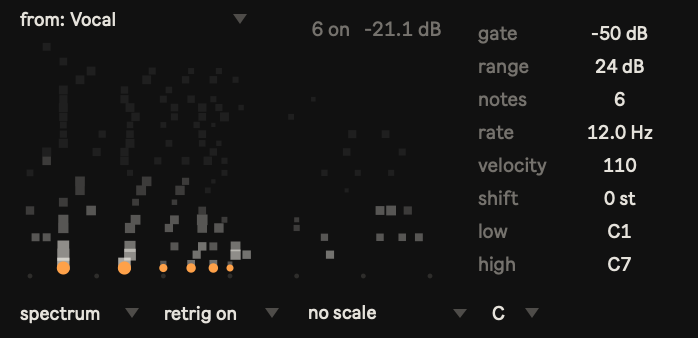
Put Kowane MIDI in front of a piano or any instrument and pick the voice track in its from menu. Three modes turn the analysis into notes: formant, spectrum (the closest to speech) and envelope (vowel colour as clusters). Any number of Kowane MIDI can listen to one Kowane, each with its own settings.
Plucked bundles

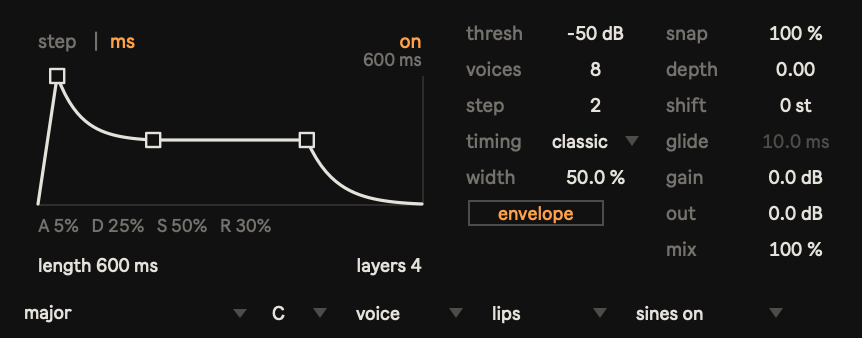
The envelope turns each step into a plucked bundle of sines with its own attack, decay, sustain and release, measured in steps or milliseconds, with up to eight overlapping layers.
See the vowels

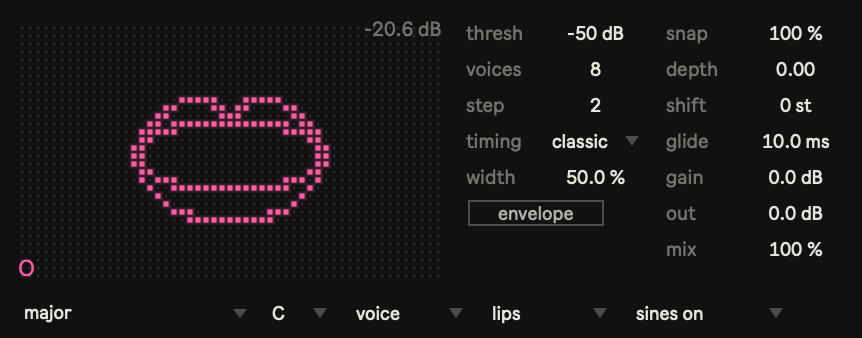
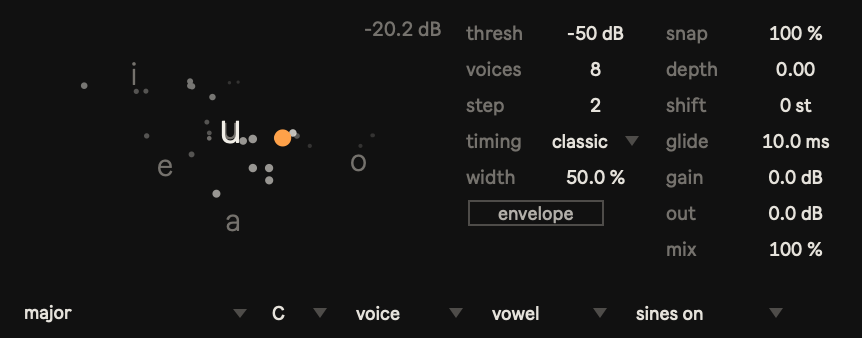
Three views show what Kowane hears: a vowel chart normalised to the speaker, a trace of the sine frequencies, and a mouth drawn in dots that opens and widens with the voice.
To sum it up

  • Kowane (Audio Effect): 1–16 sine waves from a voice
  • Kowane MIDI (MIDI Effect): formant, spectrum and envelope modes, up to 16 notes
  • Snap toward 29 scales and chords, with glide, width, depth and shift
  • Plucked envelope with up to 8 layers
  • Voice / full source for speech or drums and instruments
  • Vowel, trace and lips views
  • Several Kowane MIDI can follow one Kowane, including on return tracks and in racks

Compatibility

  • macOS — tested on Live 12.4 / Max 9.1.4
  • Windows — not tested yet
  • Ableton Live 12 Suite, or Live with Max for Live and Max 9
Max for Live device

Hamon

A polyphonic LFO driven by a fluid simulation, not a clock.

Type
Audio Effect (modulator)
Version
1.2
Price
$10
Manual
Read the manual
Pay with PayPal instead

DRM free. No license keys, no online activation. The file you download is yours to keep, and updates within the same major version are free.

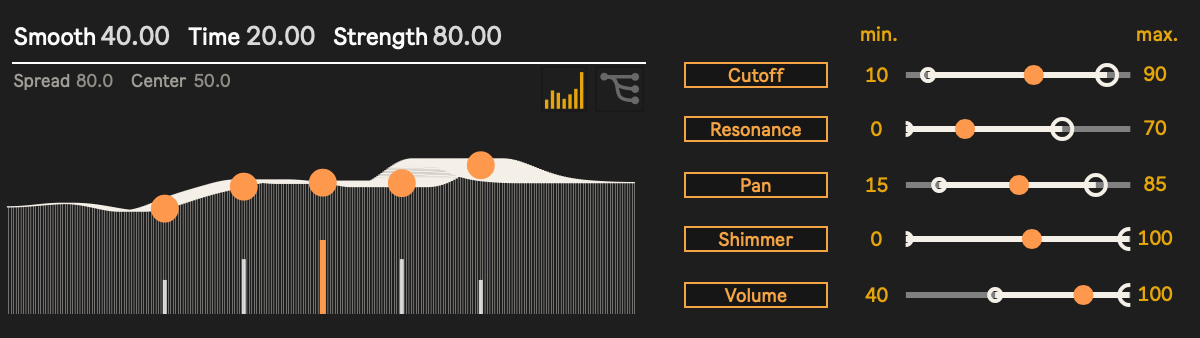
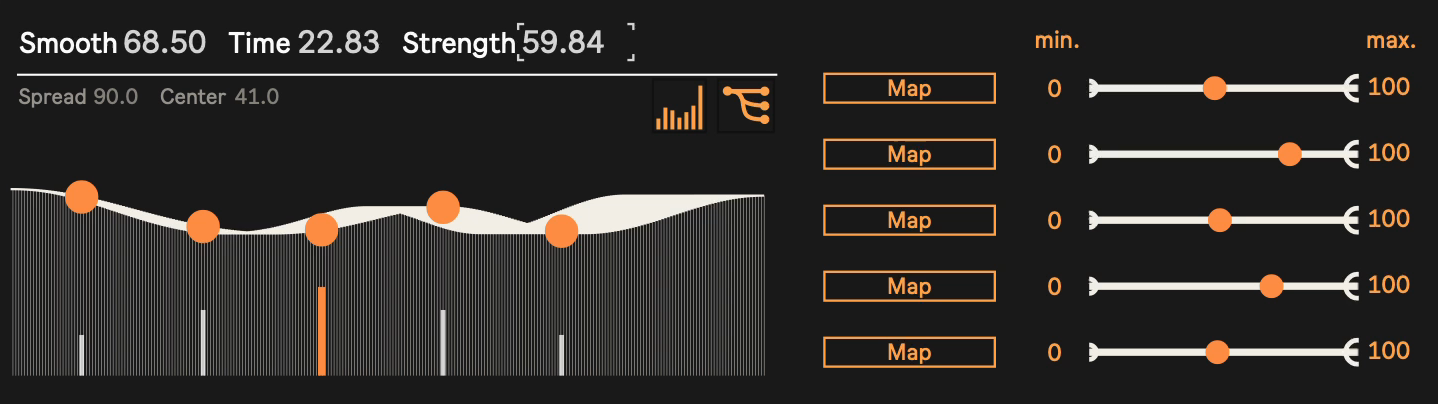
Most LFOs run on a clock: a rate in Hz or a note length. Hamon runs on water instead. Stones fall into a simulated water surface on their own, and five buoys float on the ripples; the height of each buoy becomes one of five LFOs. The movement is smooth, related across the five outputs, and never locked to the beat.

Water, not a clock

Hamon simulates a single line of water. Nobody throws the stones: one falls at a random spot whenever the surface gets too calm, so the water never repeats and never stops moving. Strength, Time and Smooth set how busy, how slow and how soft it is.

Map anything

Click Map, then click any parameter in Live. Each of the five rows sets its own min and max, so one LFO can sweep a filter wide open while another only nudges the pan.

Free from the beat

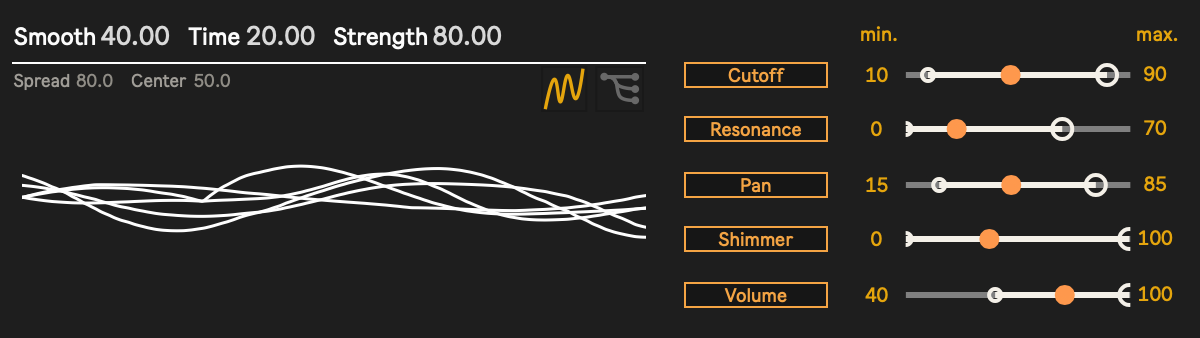
Hamon ignores Live's tempo and transport. Use it where tempo-synced LFOs sound mechanical: a filter on a pad, a wavetable position, reverb size, the pan of a texture. Against a steady drum part, the free movement stands out. The scope view draws all five outputs over the last few seconds.

To sum it up

  • Five LFO outputs, each mapped to any parameter in Live
  • min / max range per output
  • Strength, Time and Smooth for the water
  • Center and Spread for the buoys (or drag on the display)
  • Water view and LFO scope view
  • Several Hamons run independently
  • Runs whether or not Live is playing
  • Frozen device: nothing else to install

Compatibility

  • macOS — Apple Silicon / Intel
  • Windows — 64-bit
  • Ableton Live 12 with Max for Live (tested on Live 12.4)

Got Hamon on Gumroad before? Version 1.2 has been sent to the email address you used there. If it didn't arrive, write to shop@cotofu.com.

Video

Max for Live device

JV-1080 Select

Browse and recall Roland JV-1080 patches from Live.

Type
MIDI Effect (hardware patch selector)
Version
1.0
Price
Free
Download (zip, 50 KB)
JV-1080 Select

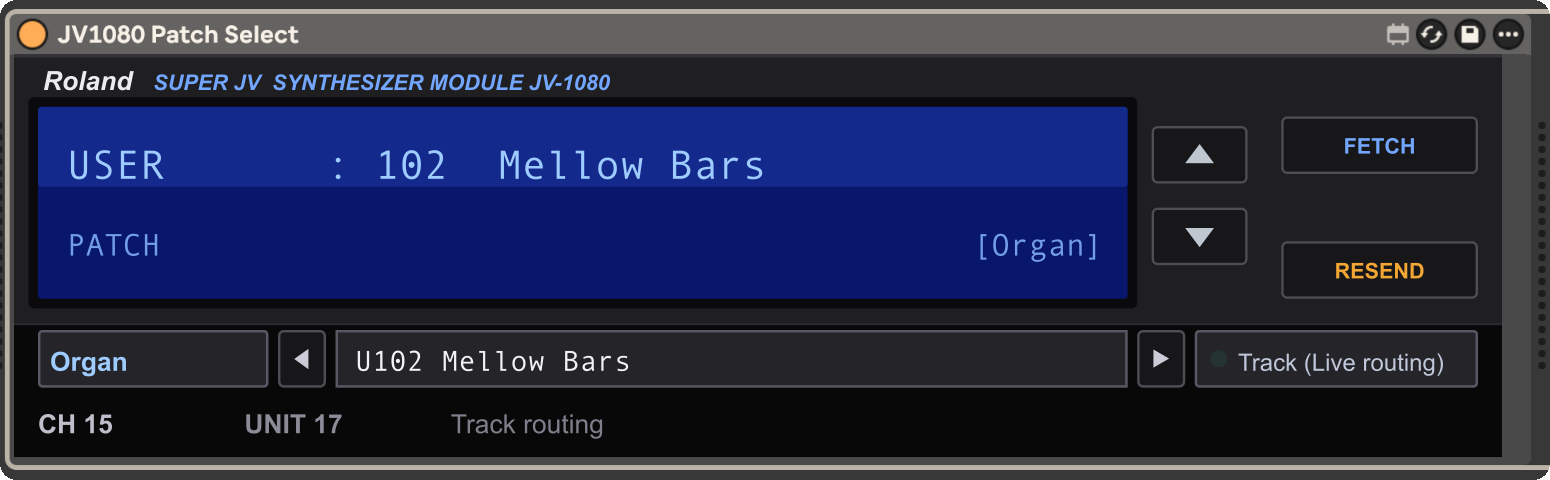
Browse and recall Roland JV-1080 patches directly from Ableton Live. Pick a category, pick a patch, and the hardware switches. The patch you choose is saved with your Live set and sent back to the JV-1080 when you open the set again.

Features

  • All 640 factory and user patches (PR-A/B/C/D + USER), tagged into 17 categories
  • No track routing needed: pick your MIDI interface once in the Port menu (ports named "JV" connect automatically)
  • Bank select and program change with the correct JV-1080 bank map
  • Fetch reads which patch is currently on the hardware
  • Set recall restores the patch when you reopen the Live set

Compatibility

  • Ableton Live 11.1 or later with Max for Live
  • macOS (tested on Apple Silicon)
  • Windows / Intel Mac: untested (set Port to "Track (Live routing)")

This device selects patches; it does not carry notes or audio. To play and hear the JV-1080, use Live's External Instrument (MIDI To → your JV-1080 port, Audio From → its inputs) or monitor through your mixer.

Not affiliated with Roland Corporation. JV-1080 is a trademark of Roland Corporation.

Max for Live device

FS1R Select

Browse and recall Yamaha FS1R performances from Live.

Type
MIDI Effect (hardware performance selector)
Version
1.0
Price
Free
Download (zip, 55 KB)
FS1R Select

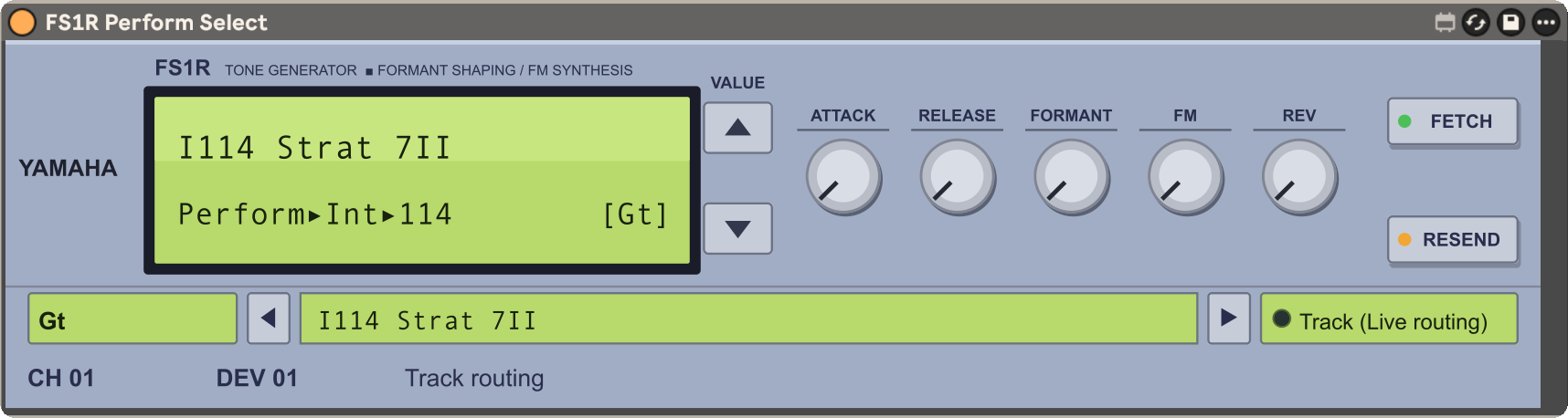
Browse and recall Yamaha FS1R performances directly from Ableton Live. Search by category, click, and the hardware switches. The performance and five knobs are saved with your Live set and sent back to the FS1R when you open the set again.

Features

  • The factory performance banks, searchable by category
  • Five performance knobs: Attack, Release, Formant, FM (hardware CCs) and REV (reverb return via SysEx)
  • No track routing needed: pick your MIDI interface once in the Port menu (ports named "FS1R" connect automatically)
  • Fetch reads the unit's performance channel and settings over SysEx
  • Set recall restores the performance and knob values when you reopen the Live set

Compatibility

  • Ableton Live 11.1 or later with Max for Live
  • macOS (tested on Apple Silicon)
  • Windows / Intel Mac: untested (set Port to "Track (Live routing)")

This device selects performances; it does not carry notes or audio. To play and hear the FS1R, use Live's External Instrument or monitor through your mixer.

Not affiliated with Yamaha Corporation. FS1R is a trademark of Yamaha Corporation.